You know the situation: you're mixing a lead vocal recorded on a good mic and can't work out what's wrong. The frequencies and dynamics are fine, there's a nice reverb on it, but it doesn't work as a whole. A vocal like that often sounds too detailed and doesn't feel like part of the story. Instead of getting pulled into the song, you're listening to a singer standing in a vocal booth, singing nicely. What's going on, and how do you fix it?
Why does too much detail kill the magic?
Cinema is a good comparison here. Film grew up around the standard of 24 frames per second. That's fast enough for the brain to read a sequence of pictures as continuous motion, but slow enough to leave tiny gaps between the frames. Those gaps are where the cinematic feeling comes from: unlike real life, a film lets the brain stop processing a flood of information and "rest" while it enjoys the picture.
We love Peter Jackson's Lord of the Rings trilogy, so when he stretched The Hobbit into three films we were unpleasantly surprised. Not even because of the story or the scenes padded out of nothing: the films were shot at the then-fashionable 48 frames per second, and people came out of the cinema with a strange feeling instead of the promised immersion in Middle-earth. The doubled frame rate wiped away the fairy-tale haze: the majestic elves looked like actors in make-up and wigs. Ang Lee's Gemini Man (2019), shot at 120 frames per second, went the same way. Critics said the action scenes looked less like a big film and more like a sports broadcast or an expensive video game cutscene. When the eye sees absolutely everything, the brain stops filling in the gaps.
Voice works the same way. Vocals are usually recorded at 24 or 32 bits, which means millions or billions of volume steps are baked into the sound. The brain reacts to them whether it wants to or not, and when a recording is too detailed and too close to the mic, all that precision just gets in the way. You hear every mouth click and breath, so the brain does extra work and can't relax.
How a bitcrusher works
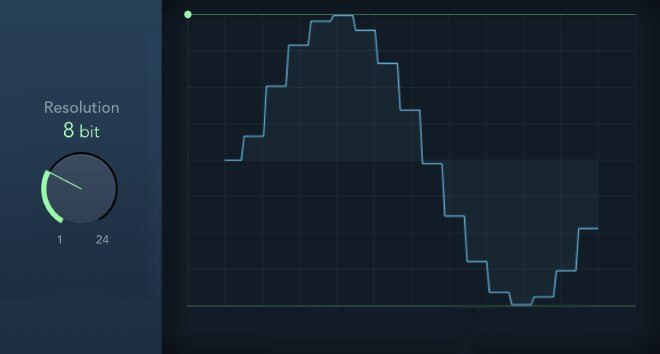
A bitcrusher is a plugin that deliberately lowers the bit depth of a signal, "degrading" its digital resolution. In Ableton it's Redux, and there are plenty of alternatives. At 16 bits a sound has 2¹⁶ = 65,536 volume levels, and dropping just one bit halves the resolution. At 13 bits you're left with 2¹³ = 8,192 steps.
The side effect is noise: the relatively smooth signal turns into a stepped, "square" one.
How many bits should a vocal get?
In the spring we were mixing a very important track for big artists, and the singer's voice felt incredibly detailed. So we wondered: what if we lowered the bit depth on the lead vocal track? We put a bitcrusher on the lead and set it to 13 bits. It worked surprisingly well: the vocal turned soft and smooth, and because of that the tracks in the DAW finally came together as a song. Soon after, we found out that Jaycen Joshua used the same trick mixing The Weeknd's 2018 EP My Dear Melancholy.
How many bits to take off, we wrote back in 2021:
- A slight reduction, from 16 to 15 or 14 bits, helps a vocal sit in the arrangement: it gets less detailed and glues to the other instruments.
- On The Weeknd's "Call Out My Name", the lead vocal's bit depth is lowered from 16 to 12 bits. That takes away the excess sibilant clarity, roughens the tone and adds grain, and the track comes across as more emotional and raw.
Keep an eye (and an ear :3) on the side effects, the noise and the grain, so they don't stick out. Unless that's the musical idea, of course. That doesn't mean we now put a bitcrusher on the vocal in every project, but when the source comes in overly detailed, we always try something like it.
Not just vocals
The trick also worked great on acoustic guitars when we were mixing a track for тима ищет свет (tima ishchet svet).
You can steer the listener's attention by adjusting how detailed individual instruments are. Making them sound less "precise" gives you a cleaner, more transparent mix overall. That's the paradox. The classic example is cutting the highs and lows on backing vocals and compressing percussion: by reducing the amount of information from each instrument, you win in the long run and end up with a mix where everything has its own place.
In our tier list, bitcrushing the vocal is B: it works, but not everywhere. Soft backing vocals without harsh consonants are a separate topic.
FAQ
Why put a bitcrusher on a vocal?
To remove excess detail. An overly crisp recording made close to the mic exposes every breath and mouth click, and it feels like a singer singing nicely in a booth rather than telling a story. A small drop in bit depth softens the vocal and helps it glue to the arrangement.
What bit depth should I use?
Start with a small drop, from 16 to 15 or 14 bits. On an overly detailed source we went to 13 bits. At 12 bits, like the vocal on The Weeknd's "Call Out My Name", the tone is already noticeably rougher and grainier.
Will a bitcrusher ruin the sound?
The side effect is noise and grain. The main thing is to keep them from sticking out. If they do, and the musical idea doesn't call for it, we bring the bit depth back up.