Until 2024 we were very proud of working without a template, building every project from scratch with no presets. Pavel's trip to Andrew Scheps's Mix With The Masters seminar completely changed our minds about that.
Why use a mixing template?
Once we'd gone through a lot of Scheps's hit sessions (Lana Del Rey, Hozier, Green Day, Jay-Z and many others), it was clear we'd had templates wrong. A template is a set of tools picked carefully over years, much more than a pile of presets you load onto every new song. A well-built one makes you faster, but more importantly it shapes your sound and lets your taste come through.
The first version: Scheps, Jaycen Joshua and Manny Marroquin
Building the right template in one go is hard, so for the first working version we took Andrew Scheps's setup, added a pinch of Jaycen Joshua's drum techniques and Manny Marroquin's approach to EQ. From then on, whenever a good idea came up during a mix, we saved it and tried it on the next projects, and the best presets went into the template.
After two years of collecting like this we were working several times more efficiently: our own sound finally started to take shape, and the quality of the mixes became much more consistent. In 2025 alone we made more than 30 versions of the template. Sounds like the setup for selling you our template on Telegram, but no.
Processing on the tracks, buses for convenience
The main idea of our template is that all primary processing happens right on the source tracks, while the buses are there for exporting, level control and shared sends. This solves one of the most common problems in mixing: losing track of the processing inside a session.
We took this approach largely from Scheps, and he didn't arrive at it right away himself. Nine years ago he published his template on PureMix. At the seminar there was a chance to compare that old session with the new one Andrew gave all the students, and to ask him about it.
In the old session the signal went straight through a lot of plugins, buses and master processing. A snare dropped into a session like that got compressed several times right away and sent to a reverb and a few coloring drum buses with saturation. The idea made sense: get a finished sound fast and keep sessions efficient.
But after years of testing, Scheps realized the approach isn't always sensible, especially when you need to stay close to the demo. When a big part of the processing is smeared across buses, you get the classic situation: you hear a problem but can't tell what's causing it. Fixes get harder, mixing gets less comfortable.
So in Scheps's new template nothing is processed by default: the sends and processing are there as options you can quickly try. A template should be a tool for trying ideas fast. It shouldn't be a box that mixes the song for you. For the same reason Scheps stopped using his Rear Bus by default; we covered that in the tier list.
Routing: nested like a matryoshka
We sum in several levels, so at the final stage we have maximum control with as few faders as possible. It also helps a lot when exporting track-outs, stems and concert versions.
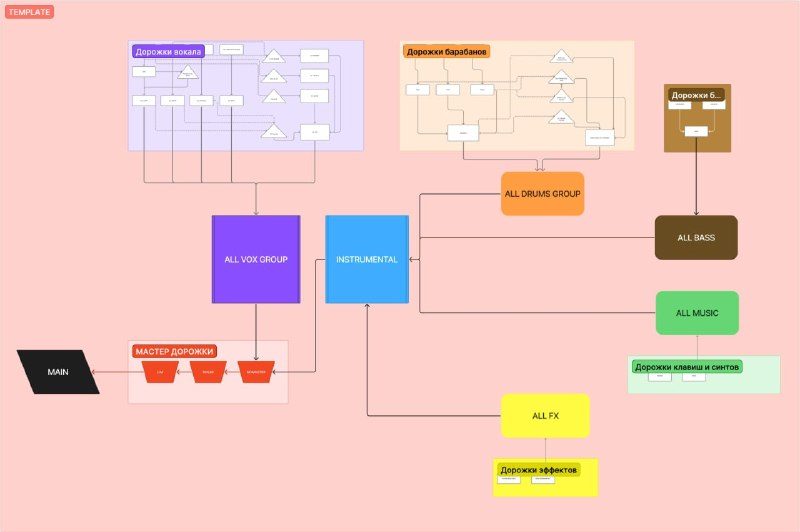
Level 1: source tracks and subgroups
Each track goes to its own clean subgroup: Kick to KICK, Snare to SNARE, the lead vocal to LEAD, backing vocals to ALLBACKS, a noise effect to FX. These subgroups are there mainly to make summing and organizing the session easier, and they have hardly any plugins on them.
From them we send to the thickening effects, mostly various kinds of parallel saturation and compression. Whether we use them depends on the genre: rock and dense hip-hop will definitely get more parallel compression than a romantic piano ballad.
Level 2: five main buses
Next, the subgroups go into five main buses. This is the backbone of the template: it lets you move whole groups of instruments with one fader.
- >drums: all drums (Kick, Snare, Tops, drum loops).
- >bass bus: all basses.
- >music: all melodic and instrumental parts.
- >all fx: sound design, transitions, reverse effects.
- all vox: the most complicated bus. It gets not only all the vocals (leads, backs, doubles) but also every vocal return: reverbs, delays, doublers, parallel compression and saturation.
Levels 3 and 4: final summing and the master
The instrument buses (>drums, >music, >bass bus, >all fx) are summed into one instrumental bus. Then instrumental and all vox meet on the nomaster bus. Nothing sits on it; it exists only to export a version of the mix without master processing for the mastering engineer. From there the signal goes to nolim, where most of the master processing happens (SSLComp, StandardCLIP, bx_digital V3), everything except limiting. Then it goes to lim, which holds a limiter or maximizer, most often Pro-L 2 or Ozone Maximizer.
Why three buses in the master section?
All this complication is there for one reason: after the mix we can export three versions for the mastering engineer in one click:
- nomaster: the mix without master processing;
- nolim: the version without the limiter. Going by our stats, this is the one the mastering engineers we work with use most often;
- lim: our own "master" with the limiter. The mastering engineer uses it as a point of comparison, so they don't accidentally end up quieter.
We mix straight into a limiter, by the way: in our tier list that technique is L, "legendary", our top tier.
Mixing faster with macros
Watching Andrew Scheps work, we were surprised how much of his workflow he'd automated. He has a macro for every routine task and runs them from a Stream Deck controller. It's a bit like working on an analog console, where everything you need is within arm's reach. We wanted the same in our own setup.
We started simple: we looked at the five plugins we use most and put each one on a shortcut. Sounds primitive, but it saves 10–15 minutes per mix right away and, more importantly, keeps you in the flow.
There are more elaborate macros too. One puts a declicker on every clip of the selected tracks and renders the result right away. A lifesaver when a song has 100 backing vocals full of artifacts.
Live drums in the template get their own breakdown.
FAQ
Is a mixing template just a set of presets?
No. For us it's a set of tools we picked carefully over two years. It makes us faster, but the main thing is that it shapes our own sound.
How do I build my own template?
We started from Andrew Scheps's setup, then kept saving the good ideas from our own mixes and trying them on the next projects. That's how our template came together over two years, and in 2025 alone it went through more than 30 versions.
Which version of the mix should I send to mastering?
We export three: nomaster (no master processing), nolim (no limiter) and lim (with the limiter). The mastering engineers we work with most often take nolim, and they use the limited one as a loudness reference.